Poor key control can turn one missing key into a $500 to $5,000+ problem fast. If I run a self-storage site, I need a written policy, coded key records, daily checkout logs, overlock tracking, tight master-key rules, and set audit dates.
Here’s the short version:
- Track every key and lock, not just tenant unit keys
- Code keys without unit numbers or names on tags
- Limit who can issue, hold, and return high-risk keys
- Log every checkout and return by date, time, user, and reason
- Keep overlock records separate from general key records
- Audit monthly at the site level and quarterly across locations
- Act fast on missing keys – some cases may need rekeying within 24 hours
A weak system leads to the same problems again and again: lost keys, lock mix-ups, blocked tenant access, and rekeying bills that stack up. At larger sites, even a 1% to 3% error rate in manual logs can create access gaps if no one catches them during audits.
If I had to boil the whole guide down to one point, it would be this: every key movement should leave a record, and every record should match what’s physically on site.
This guide walks through the core parts of that system in plain terms, so you can set rules, track keys, and cut avoidable risk.
How to Build a Written Key Control Policy
Write one policy that covers key classes, storage, issuance, return, duplication, incident response, and audit timing. Then use those same policy terms in the master inventory and the staff checkout log.
Classify Keys, Locks, and Access Levels
Classify every key and credential by access level and approval authority. A simple setup like this works well:
| Key Class | Examples | Who Can Approve Issuance |
|---|---|---|
| Tenant unit keys | Tenant unit keys | Site manager |
| Overlocks | Delinquent-unit locks | Site manager; manager approval for removal |
| Master keys | Full-facility access | Owner or senior management only |
| Zone keys | Building, floor, or product-type access | Regional manager |
| Contractor / temporary keys | Issued per work order | Manager approval; corporate for major projects |
| Gate credentials / fobs | Tenant, staff, and contractor access codes | Site manager; corporate for staff-level changes |
Keep approvals limited by class. That keeps access tight and cuts the damage from a single mistake. Once your classes are set, match each one to a storage rule, label format, and duplication rule.
Set Rules for Labeling, Storage, and Duplication
Never label a key with a unit number, tenant name, or facility address. If that key goes missing, the label gives a stranger a map to what it opens.
Use a non-identifying alphanumeric code instead. Something like B2-214K works, as long as the link to the actual unit appears only in a secure inventory file and never on the tag. Overlock keys might use a code like OL-37, while master keys should carry only a class code such as MK-1. Use durable, tamper-resistant tags, and state who can create or change codes.
For storage, all unissued keys should stay in a locked steel cabinet in a staff-only area, out of sight from the customer lobby. Master keys and high-security overlocks need tighter control, so store them in a separate inner lockbox or safe inside that cabinet. The policy should name who holds the cabinet key and require a daily open-and-close check with a signed entry on a daily checklist.
Duplication rules need to be blunt. No employee, contractor, or tenant may copy a facility-controlled key without written authorization. For master and high-security keys, use restricted keyways. Those blanks are only available through a registered locksmith, which makes unauthorized copying much harder. Log every approved duplication request with the key class, reason, approving manager, date, and vendor name.
Document Lost Keys, Staff Terminations, and Audit Schedules
Once labeling and duplication rules are in place, spell out what happens when keys go missing or staff leave.
Lost keys need an immediate response, not a next-day callback. The policy should require any missing key to be reported at once to the site manager. For master keys, the timeline should be tight: rekeying or cylinder replacement within 24 hours. For lower-risk keys, 3 business days is a fair outside limit. Every incident should produce a written report that lists the key code, last assigned user, probable cause, and corrective action taken.
Employee exits are one of the biggest sources of access gaps. The policy should require a mandatory separation checklist completed before, or at the moment of, termination for involuntary exits. That means collecting all physical keys, turning off gate codes and software access, and checking returns against the checkout log, not someone’s memory. Role changes need the same treatment. If an assistant manager becomes a site manager, their access list should be formally updated, not just assumed.
For audits, set a monthly site-level count and a quarterly portfolio-level review as your baseline. Monthly checks should cover physical key counts against the inventory list, overlock log reconciliation, and a sample review of checkout entries. Quarterly reviews should look across sites for patterns like frequent key loss at one location, inconsistent labeling, or unusually high contractor access, then send corrective action plans back to ownership or asset managers.
sbb-itb-09b4138
How to Set Up Inventory Records for Keys, Locks, and Overlocks
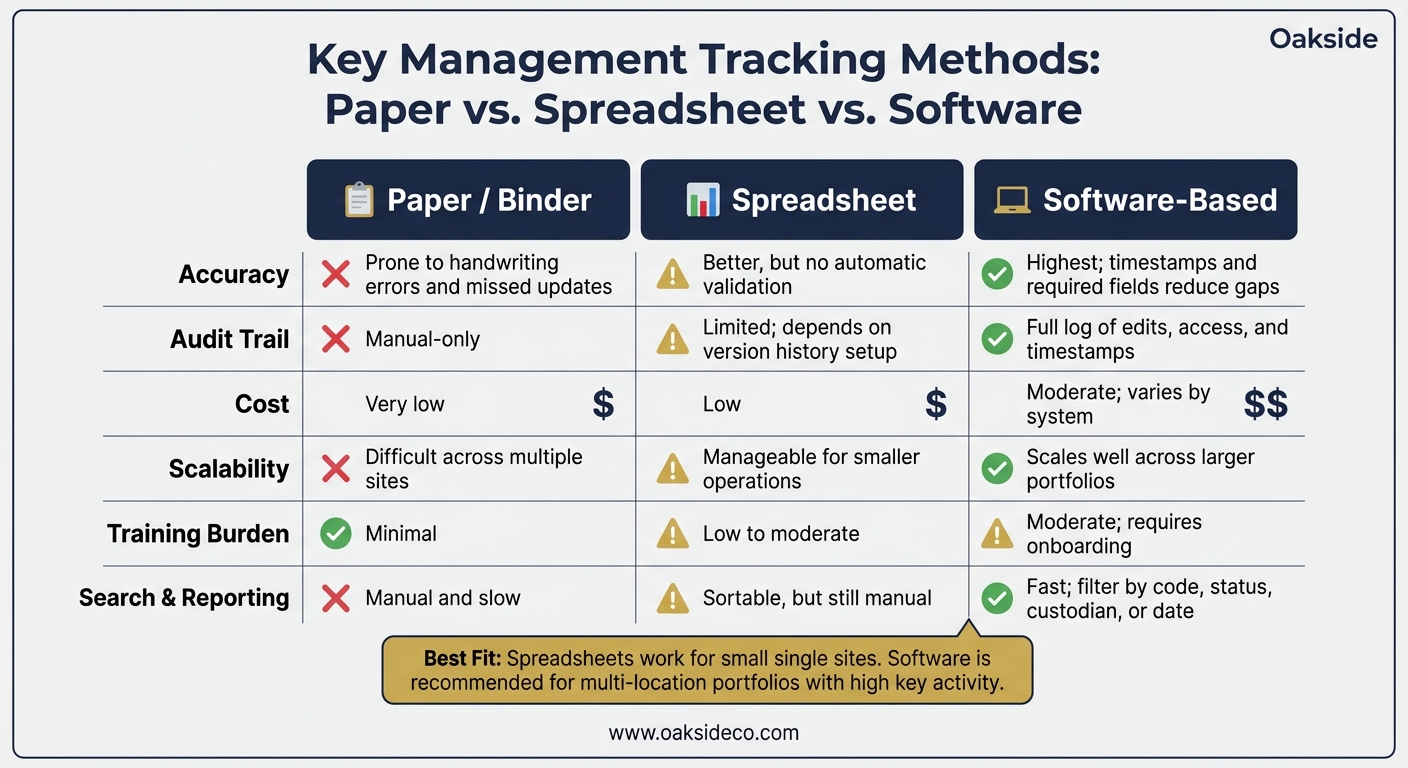
Paper vs. Spreadsheet vs. Software: Key Management Tracking Compared
Incomplete records weaken key control fast. Your inventory is the working part of the policy. It’s the place where checkout logs, audits, and incident reports all connect.
Create a Master Inventory with Unique Key and Lock Codes
Every key, lock, and overlock in the facility needs its own record. That means unit doors, gate locks, office doors, restricted rooms, and spare lock stock too.
Use one code for each item, and use that same code in the inventory file and on the tag. Keep the code-to-location cross-reference in a restricted inventory file or system with role-based access. That way, staff can do their jobs without giving broad access to sensitive details.
At a minimum, each record should include:
- item code
- location or access point served
- assigned custodian
- issue date
- current status
- last audit date
Use the same status terms across the team: issued, missing, damaged, retired, and reassigned. If one person writes “checked out” and another writes “active,” the record gets messy in a hurry.
For lock stock, set a minimum on-hand level and reorder when inventory hits that mark. If delinquency activity is common, keep reserve lock stock on site and reorder at a set minimum. Review those thresholds after busy seasons or after unusual spikes in vacancies, evictions, or move-outs.
| Field | Example Entry |
|---|---|
| Item Code | K-0147 |
| Location Served | Unit or door on file |
| Assigned Custodian | Authorized custodian |
| Issue Date | Recorded in inventory |
| Status | Issued |
| Last Audit Date | Recorded during audit |
| Reorder Threshold | N/A (key) |
Keep overlock records separate from the main inventory. That makes removal dates and account status changes much easier to see.
Track Overlock Removal and Unit Status Changes
Overlocks need their own log, separate from the general key inventory. Staff should be able to check which delinquent units are secured without digging through unrelated key records.
Each overlock entry should include the unit number, overlock code, date applied, reason, staff member who applied it, and the removal date once the account is cleared.
When a tenant pays and the overlock is removed, update that same record with the payment-cleared date, the staff member who removed the lock, and the new status. That keeps the lock record lined up with the account record.
One smart control step is a second verification before any overlock comes off. First, confirm the account status in the property management system. Then remove the lock. It sounds simple, but it helps stop a common slip-up: taking off an overlock before the balance is actually cleared.
Paper Logs vs. Software-Based Tracking: A Comparison
Paper logs and spreadsheets can work at small sites. But once volume and turnover start climbing, they get harder to manage. The tracking method matters because the same inventory needs to stay usable during audits and shift changes.
| Factor | Paper / Binder | Spreadsheet | Software-Based |
|---|---|---|---|
| Accuracy | Prone to handwriting errors and missed updates | Better, but no automatic validation | Highest; timestamps and required fields reduce gaps |
| Audit Trail | Manual-only audit trail | Limited; version history depends on setup | Full log of edits, access, and timestamps |
| Cost | Very low | Low | Moderate; varies by system |
| Scalability | Difficult across multiple sites | Manageable for smaller operations | Scales well across larger portfolios |
| Training Burden | Minimal | Low to moderate | Moderate; requires onboarding |
| Search & Reporting | Manual and slow | Sortable, but still manual | Fast; filter by code, status, custodian, or date |
For inventory tracking, spreadsheets fit small sites well. Software works better when you’re dealing with multiple locations, more staff, and more moving parts.
How to Run Daily Checkout Logs and Secure Access Procedures
Daily checkout logs put policy into action.
Use a Formal Staff Key Checkout Log
Use a formal log that records the date, time issued, key code, employee, reason, expected return, actual return, and manager initials. Every entry should use the same key codes listed in the master inventory.
At opening, the on-duty manager unlocks the storage cabinet and checks the physical keys against the prior day’s closing log. If a key is still marked out, that needs an immediate explanation before any new keys go out. At closing, the manager matches the log to the cabinet. Every key marked returned must be physically there. If something is missing, document it in an incident entry on the spot. Those entries become the source record for monthly reconciliation.
No key-based task starts until the log is filled out. If a key comes back late, the manager notes it and follows up. If late returns keep happening, that becomes a documented performance issue.
Control Master Keys, Contractor Access, and After-Hours Use
Before issuing any high-risk key, use the same key codes listed in the inventory log. Keep master-key custody limited to the property manager and the designated senior staff named in the policy. That helps stop mix-ups and unauthorized access, not just sloppy storage.
Apply a strict no-off-site rule to master keys. If a manager has to carry one off-site during an emergency, the policy should require written authorization, a clear return deadline, and next-day confirmation. Any unauthorized removal should be treated as a serious policy violation.
For contractors and vendors, use escort-only access. A staff member with the right key goes with the contractor to the unit or mechanical room and remains on-site while the work is done. If a limited-access key must be issued for a short period, the checkout log should record:
- The contractor’s company name
- The representative’s name
- The key code
- The areas covered
- The expected return time
No vendor key stays off-site after close of business.
After-hours access should use a separate log or form. Only designated on-call managers may use keys after hours, and each entry needs the time, key, area, and reason. The property manager reviews all after-hours entries the next business day. Any exception should stand out in the next inventory check.
Manual Logbooks vs. Digital Checkout Records: A Comparison
Manual logbooks can work well at small, stable sites. Digital records tend to work better as key activity grows, and they can flag overdue returns automatically. Here’s a side-by-side view:
| Factor | Manual Logbook | Digital Checkout Records |
|---|---|---|
| Ease of Review | Requires page-by-page scanning; slow for historical lookups | Searchable by employee, key code, or date in seconds |
| Error Risk | High; illegible handwriting and missed fields are common | Low; required fields and automatic timestamps reduce gaps |
| Audit Trail | Manual only; logs can be lost, damaged, or altered | Full edit history with timestamps and user access records |
| Searchability | Difficult; pattern tracking requires manual re-entry | Instant filtering by date range, staff member, or key ID |
| Overdue Key Alerts | None; manager must notice manually | Automated flags or reminders when expected return time passes |
Both methods support accountability in day-to-day operations and feed straight into audit reconciliation. But there’s a catch: entries have to be completed every shift, with no exceptions.
How to Audit the System and Reduce Loss, Mix-Ups, and Access Gaps
Reconcile Inventory, Overlock Lists, and Checkout Records
Use your inventory, overlock log, and checkout log to make sure the situation in the field matches the record. The process is pretty simple: export the overlock and vacancy reports from your property-management software to set the expected status, walk the facility and check each flagged unit on-site against that baseline, then pull staff checkout logs from the past 48 to 72 hours and match them with the keys now in use or sitting in the cabinet.
The gaps that show up most often are pretty familiar:
- Master keys that are physically on hand but were never logged
- Keys marked as checked out to staff or contractors who are no longer allowed to have access
Log every discrepancy in an audit ledger with the date, the auditor’s name, and the corrective action taken. Don’t fix it quietly and move on. If it happened, it needs a record.
One practical move: give the monthly reconciliation to someone who did not handle the overlocks that week. A fresh set of eyes can spot things the original staff member may miss. If something doesn’t line up, send it straight into incident response.
How to Respond to Lost Keys and Suspected Access Breaches
If reconciliation turns up a missing key, start with written documentation right away. Note who found the issue, when they found it, what was happening at the time, and which key code is involved.
For a tenant key, rekey that unit. For a master key, treat the situation as a possible security breach from the start, even if it looks more like simple misplacement than theft. If a master key is lost, rekey the affected locks or replace them with new codes.
After a suspected breach, pull camera footage and electronic access logs for that time window before interviewing staff. Then put the findings into a formal incident report that includes:
- A timeline
- Affected units
- Evidence reviewed
- Remedial actions taken
Conclusion: The Minimum Controls Every Owner Should Maintain
The floor is simple: a written policy, coded inventory, daily checkout logs, controlled overlock handling, limited master-key access, and routine audits. Then do those things the same way every shift, at every site.
FAQs
Who should own key control?
Key control should sit with a designated property manager or lead staff member who is directly responsible for access and security protocols.
That person should make sure master keys and overlock tools are kept in a secure location, and that every checkout is entered into an auditable log. Clear ownership and written procedures help cut down security gaps and protect the facility’s assets.
When should a site switch to software?
A facility should move from manual processes or spreadsheets to dedicated property management software as early as possible. That shift cuts busywork, reduces errors, and makes it much easier to grow without things getting messy.
It also creates clear, audit-ready records for due diligence. On top of that, it supports standardized leases, automated collections, and clean rent rolls that can help strengthen property value.
What should happen after a missing key?
If a physical key goes missing, move fast. That’s the best way to protect site security and limit liability. Revoke access tied to the lost key, review your key inventory and staff checkout logs, and re-key or replace the affected lock if needed.
Then document the incident in plain terms: which key went missing, where it was used, and what steps you took to fix the issue. As Nolen Masserman, Managing Director at Oakside, notes, transparent, disciplined records and maintenance logs help avoid surprises during due diligence.