Automation can cut labor, add after-hours rentals, and lift NOI – but it also adds system, service, and compliance risk. There are several ways to increase self-storage property value through modernization and improved management before a sale.
If I were sizing this up today, I’d keep the takeaway simple:
- Labor savings can hit $8,000 to $10,000 per facility per year
- Heavily automated sites may drop management time to about 2 hours per week
- Unmanned sites in one reported case saw an average 18% NOI increase after six months
- The main tradeoff is more reliance on software, hardware, power, and internet
- The safest path is a phased rollout with backup access, human support, and KPI tracking
In plain terms, automation works best when I use it to remove repeat tasks first – like online rentals, auto-pay, delinquency notices, and remote access – then add smart locks, kiosks, and pricing tools later. That helps me test costs, tenant response, and payback before I commit more capital.
A short way to think about it:
| Area | What I’d expect |
|---|---|
| Leasing | 24/7 online rentals and digital leases |
| Billing | Auto-pay, late fees, and past-due reminders |
| Access | Remote gate control, mobile entry, smart locks |
| Portfolio view | One dashboard for occupancy, collections, and alerts |
| Main upside | Lower labor, more lease completion, tighter control |
| Main risk | Outages, cyber risk, setup errors, and service gaps |
So the core question isn’t whether automation helps. It’s whether the savings, lease growth, and NOI lift are enough to offset setup costs, monthly software fees, repairs, and the risk of tenant lockouts or bad workflow rules.
How Automation Improves Day-to-Day Operations
Automating Leasing, Billing, and Delinquency Management
Manual leasing, billing, and delinquency work tends to be where operators feel the most day-to-day drag. Automation removes a lot of that routine work, especially around leasing, billing, and past-due notices.
When a tenant rents online, the system can verify ID, collect payment, generate a digital lease, and send back a signed copy without staff stepping in. After that, recurring billing runs on its own. If a payment fails, the platform can send SMS or email notices on a preset schedule, apply late fees, and track the lien timeline. It also applies delinquency policy the same way every time, which can help lower legal risk.
The numbers make the case pretty clearly. Operators report $8,000 to $10,000 in annual labor savings per facility, along with sharp drops in delinquency after automation. And when a tenant crosses a delinquency threshold, modern access systems can electronically overlock the unit right away. No one has to walk the property and put on a physical lock.
Online Rentals and Smart Entry for After-Hours Access
Once leasing and billing run with less manual effort, physical access usually becomes the next choke point. Online booking paired with smart entry helps facilities rent units at any hour. A tenant can choose a unit, sign a lease, and get a gate code or mobile key within minutes, whether it’s midday or late at night.
This is especially useful in RV and boat storage, where people often need access outside office hours. One facility in Lafayette, Indiana, now runs an unmanned, tech-enabled setup for off-hour rentals and support. Customers scan QR codes to book units and receive gate and lock codes within minutes, and an AI support representative handles 100% of after-hours calls for rentals and payments. Off-hour customers are also much more likely to finish the rental when they can complete the full lease and move-in online instead of waiting for office staff.
Managing Multiple Properties From a Single Dashboard
At scale, the main win isn’t just doing fewer tasks. It’s having tighter control across the whole portfolio. For multi-site operators, automation has its biggest effect at the portfolio level: one dashboard can show occupancy, collections, access, and alerts across every property. That kind of visibility helps owners catch issues before they turn into losses.
Managers can spend less time pushing transactions through and more time making calls on pricing, staffing, and operations. Large-scale operators get back more than 500 staff hours per month for every 100 locations through automated workflows. Exception alerts can flag falling occupancy or delinquent accounts before they become loss events. That also means one employee, or a small team, can keep an eye on several properties without adding staff one site at a time.
Those gains matter only if software, hardware, and support costs stay in line.
sbb-itb-09b4138
The Financial Case for Automation and What It Actually Costs
Labor Savings, Margin Gains, and Revenue Capture
A lot of the upside shows up in NOI. When a facility moves to an unstaffed or lightly staffed setup, a single site can often operate with just 10 to 20 hours of part-time support per month. And when collections are fully automated, owners can save at least $8,000 to $10,000 per facility each year.
The other half of the story is revenue capture. With 24/7 digital booking, a facility can pick up after-hours demand that might otherwise disappear. On top of that, dynamic pricing strategies can change rates in real time based on occupancy, which helps protect yield on every occupied unit.
That matters because self-storage value is tied to NOI and cap rate. Even small cuts in expenses can have an outsized effect on asset value. 10 Federal reported that properties on its unmanned platform for at least six months posted an average 18% NOI increase. With debt leverage, that translated into a 52% increase in equity value. Of course, those gains depend on keeping system costs under control.
Upfront Costs, Ongoing Fees, and Payback Periods
Automation costs usually fall into two groups: upfront capital costs and recurring operating costs.
On the capital side, owners tend to spend on:
- smart locks
- kiosks
- cameras
- gate controls
- networking equipment
Then come the monthly or recurring costs, which often include software subscriptions, payment processing fees, AI revenue tools, and cloud security.
One plus is that SaaS updates are usually bundled in, which can cut long-term maintenance needs compared with legacy systems. But there’s still a catch: integration can take time and add cost when systems don’t connect right away.
For many owners, a phased rollout makes more sense than doing everything at once. Start with online sales and payments, then use the savings to fund hardware upgrades over time. That gives operators room to test payback periods using more realistic occupancy assumptions before going all-in on a full conversion. It also leaves space for the fact that some renters still want in-person service. And yes, the same tools that help margins can also make a site more dependent on software, hardware, and internet uptime.
Comparison Table: Financial Benefits vs. Cost Burdens
| Financial Benefit | Cost Burden |
|---|---|
| Labor savings: $8,000–$10,000 per facility per year through unstaffed or lightly staffed models | Hardware CapEx: Upfront costs for kiosks, smart locks, cameras, and gate systems |
| More lease capture: 24/7 leasing captures 3–5 additional leases per month | SaaS subscriptions: Ongoing monthly fees for facility management software, AI tools, and cloud security |
| Faster collections: 50% reduction in outstanding tenant debt within the first 12 months | Installation & networking: Wiring, internet infrastructure, and professional hardware setup |
| Yield management: Adjusts rates with demand and avoids unnecessary discounting. | Integration costs: Time and fees to connect property management, access control, and payment systems |
| NOI lift: Average 18% NOI increase reported at unmanned facilities after six months | Repair costs: Technical support and hardware repairs when systems fail |
The Main Risks of Automation and How to Address Them
System Failures, Cybersecurity, and Access Disruptions
The big tradeoff here is simple: more efficiency usually means more reliance on systems. If the internet goes down, the software bugs out, or the power cuts off, tenants can get locked out and day-to-day work can stall.
That’s why redundancy matters so much. A setup with hybrid keypads, backup access codes, and written manual-override SOPs gives staff a fallback when the main system fails.
Access control is only part of the picture. The bigger risk is data security. Cloud software, smart locks, cameras, and payment tools add more points that can be targeted. That puts tenant identity details, payment information, and access credentials at risk if security is weak. Strong built-in controls can lower that risk, including role-based access controls, encrypted APIs, audit logging, and regular penetration testing.
Customer Service Gaps and Compliance Errors
Automation can speed things up, but it can also create friction for both customers and operators. About 60% of customers still want human help at key moments, including move-in. That’s a clear sign that a hybrid support model still matters, especially when tenants run into issues that don’t fit a neat workflow.
Legal risk can show up in automated delinquency workflows too. If lien timelines or notice sequences are set up the wrong way, the result can be a compliance problem. Software follows rules, but it doesn’t judge odd cases or edge situations. That still takes human oversight.
A few guardrails help a lot:
- Document SOPs for manual overrides and human escalation
- Review automated lien and collections workflows with legal counsel
- Keep a clear phone or chat option open for tenants who need help
Comparison Table: Efficiency Gains vs. Risk Exposure
| Efficiency Gain | Risk Exposure | Mitigation |
|---|---|---|
| 24/7 self-service access | Internet or power outage causing tenant lockouts | Hybrid keypads; backup access codes |
| Automated collections and liens | Misconfigured rules leading to compliance violations | Human review before final lien execution; legal audit |
| Unstaffed or lightly staffed model | Delayed response to security or maintenance issues | Remote monitoring; contracted local maintenance |
| AI-driven dynamic pricing | Pricing model drift | Continuous monitoring; human override capability |
| Digital-first tenant experience | Alienation of tenants with complex needs | Human escalation via phone or chat |
A Practical Adoption Plan for Owners and Investors
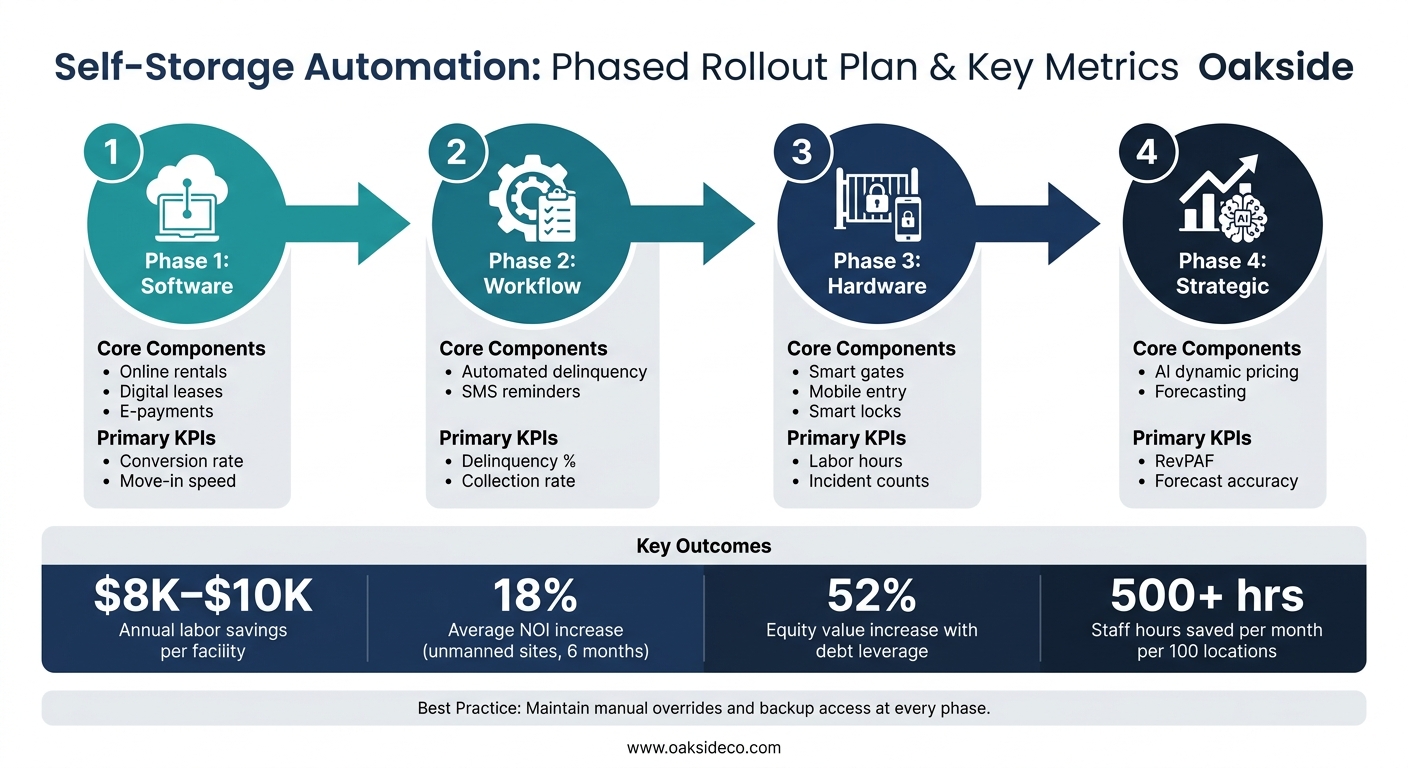
Self-Storage Automation: Phased Rollout Plan & Key Metrics
Start With a Phased Rollout and Clear KPIs
After looking at the upside and the risk, the next step is simple: adopt automation without going too far, too fast.
A phased rollout usually works best. Start with software, then move into billing workflows, then access hardware. Bring in AI tools later, once your data is clean and your core process is steady. At each stage, keep manual overrides and backup access in place. If something breaks, you need a way to keep the property running.
The other piece is measurement. Good tracking keeps the rollout honest.
Conversion rate and move-in speed show whether the digital front end is doing its job. Delinquency percentage and collection rate show whether automated billing is helping or just adding noise. Once hardware goes live, labor hours and incident counts matter more. And at the top level, Revenue per Available Square Foot (RevPAF) is the clearest sign of whether dynamic pricing is adding dollars instead of just activity.
| Implementation Phase | Core Components | Primary KPIs |
|---|---|---|
| Phase 1: Software | Online rentals, digital leases, e-payments | Conversion rate, move-in speed |
| Phase 2: Workflow | Automated delinquency, SMS reminders | Delinquency %, collection rate |
| Phase 3: Hardware | Smart gates, mobile entry, smart locks | Labor hours, incident counts |
| Phase 4: Strategic | AI dynamic pricing, forecasting | RevPAF, forecast accuracy |
When Automation Becomes a Value-Creation Decision
Once the workflow is steady, this stops being just an operations question. It becomes a capital allocation decision.
Use automation when it does one or more of three things: improves NOI, cuts operating risk, or supports exit value enough to justify the capex.
For owners in hold mode, automation can ease expense pressure in weaker markets. For owners in improve mode, automating high-impact levers – like existing-tenant rent increases, dynamic pricing, and delinquency management – can widen margin per square foot in a meaningful way. And for owners thinking about a sale, automated facilities tend to have stronger saleability with institutional investors because they are easier to scale and offer higher reliability and efficiency.
That said, markets don’t all behave the same way. Before cutting on-site staff, check local crime rates and customer preferences. A senior-heavy market, for example, may feel occupancy pressure if in-person support disappears altogether.
Conclusion: The Gains Are Real, and So Are the Risks
The right rollout creates efficiency. The wrong one creates dependency.
Automation can drive real margin gains and steadier operations, but it works best when operators pair the tech with process discipline and tight measurement at every phase.
FAQs
How much does self-storage automation usually cost?
The cost of self-storage automation can vary a lot. It depends on what a facility needs and how much of the operation is being connected.
A fully automated setup usually calls for a big upfront spend on software, hardware, and security systems.
That said, many operators don’t do everything at once. They take a phased approach, then put savings from early efficiency gains back into more systems over time.
So yes, automation often requires upfront capital. But the goal is simple: cut long-term operating costs and improve net operating income.
Which tasks should owners automate first?
Start with the tasks that happen often and create the most friction, especially the ones tied most closely to revenue or risk. For most operators, that means online sales and payment processing first. If customers can rent and pay without hiccups, you remove a major source of drop-off.
After that, put your attention on leasing, pricing execution, and reporting. Those areas help you get returns faster and with fewer errors. When occupancy and monthly recurring revenue are steady, you can put profits back into automated access and security systems.
What backups are needed if systems fail?
If automated systems fail, operators need fast IT support, regular maintenance, and a strong technical setup to cut downtime.
Because access, billing, and security often rely on software, human oversight still matters. Some situations are unusual. Others are high-stakes failures that need manual intervention right away.