Boat storage theft can involve assets worth $25,000 to $250,000+, so I’d treat surveillance as a basic risk-control step, not an add-on.
If I were planning or reviewing a system, I’d focus on four things right away:
- Scare off theft and trespass
- Record clear video for claims and disputes
- Watch the site after hours
- Keep written rules for footage and retention
I’d also match the setup to the property. A fenced inland yard usually needs strong gate, lane, and trailer coverage. A marina or waterfront site also needs cameras on docks, slips, and launch ramps. For gates, I’d use 4MP to 4K IP cameras, and in hot coastal areas I’d check housings rated for temperatures above 122°F.
Here’s the short version:
- Record gates and docks all the time
- Use motion recording on aisles and perimeter areas
- Place cameras so views overlap
- Limit remote access to approved managers
- Clean lenses and update firmware on a set schedule
- Test night video, not just daytime images
Good surveillance does two simple jobs: it helps stop problems, and it gives you proof when problems happen. That’s the point of the system, whether you run a dry storage yard, a marina, or both.
Choose the Right Surveillance System for the Site
Once you know the main risks, the next step is simple: match the camera setup to the parts of the property most likely to get hit. Boat storage sites aren’t like indoor facilities or small parking lots. They deal with open yards, waterfront conditions, and harsh weather. So the system has to fit the site, not the other way around.
Camera Types That Fit Boat Storage Environments
Use weather-rated cameras for gates, docks, fence lines, and open storage rows. These are the spots that usually need the most attention.
For gates and other entry points, high-resolution IP cameras in the 4MP to 4K range are recommended. That level of detail helps capture faces and license plates at gates and along drive lanes. If someone comes in after hours or leaves with a trailer, clear footage makes a big difference.
In coastal and marina settings, heat-rated enclosures or cooling may also be needed because temperatures can exceed 122°F. Salt air, direct sun, and long hours outside can be hard on equipment, so it pays to choose cameras built for that kind of exposure.
Recording, Retention, and Remote Access Settings
Record gates and docks continuously. Those areas tend to have the most traffic and the most risk, so full-time recording makes sense.
For aisles and perimeter lines, use motion-triggered recording to cut down on storage use. That way, you’re not filling the system with hours of empty footage.
Keep remote access limited to authorized managers, and use mobile review for after-hours incidents. If something happens late at night, staff can check footage fast without needing to drive to the site.
After the system is selected, coverage planning determines whether it actually protects the site.
sbb-itb-09b4138
Design Camera Coverage That Protects the Property
Placement matters more than camera count. A smaller set of well-placed cameras will do more for you than a pile of cameras with gaps between them.
The goal is simple: make each camera back up the next one. When fields of view overlap, you cut down blind spots and make it much easier to track movement across the property. So the next step is putting each camera where it covers the most risk with the fewest missed areas.
Priority Coverage Zones for Dry Storage and Marina Operations
For boat storage, split your plan into two parts: dry-storage needs and marina needs. They’re not the same, and treating them like they are can leave weak spots.
Start by mapping the highest-risk zones across both areas:
- gates
- drive lanes
- fence lines
- docks
- slips
- launch ramps
These are the places most likely to lead to theft, trespass, and damage claims. Entrances and exits should have overlapping camera views so you can trace traffic from start to finish. After that, cover open rows, trailer lanes, and vessel staging areas. Good footage in these spots helps confirm who came in, what moved, and when it happened.
Operate and Maintain the System as Part of a Layered Security Plan
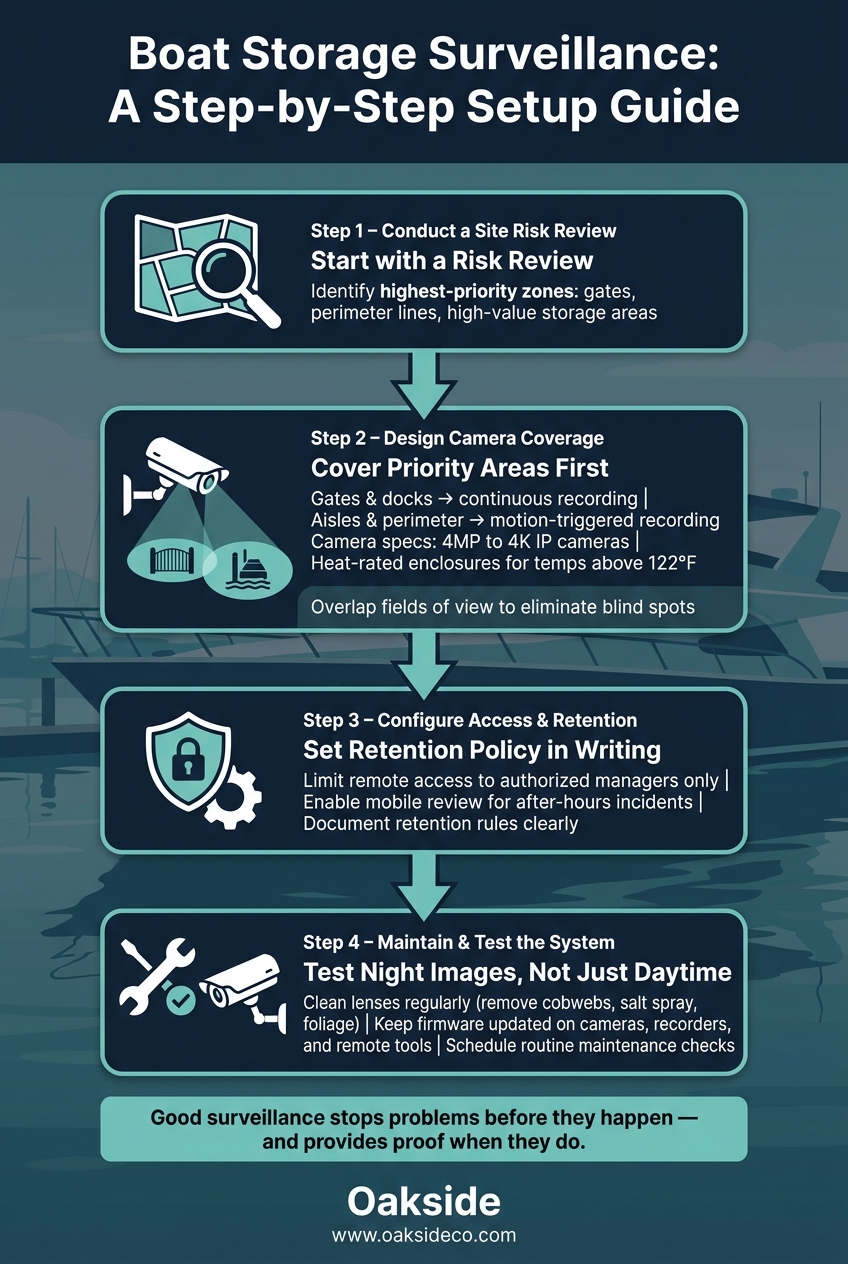
Boat Storage Surveillance Setup: Step-by-Step Planning Guide
Maintenance and Firmware Updates
Once your coverage is set, the next job is simple: keep the system working the way it should.
Routine maintenance helps make sure footage is still clear when something goes wrong. Clean camera lenses on a regular schedule, and clear away cobwebs, salt spray, and overgrown foliage before they get in the way.
Firmware updates matter too. Keep cameras, recorders, and remote access tools up to date so they’re patched against known vulnerabilities. That helps keep footage usable for incident reviews, insurance claims, and access disputes.
Conclusion: Use Surveillance to Reduce Risk and Support Asset Performance
Once camera placement and retention are set, surveillance shifts from a one-time install to an everyday risk-control tool. Boat storage facilities carry serious exposure, so the camera system should work as part of a broader security plan. It can also help on the business side: a facility with documented, well-kept surveillance is in a stronger position during due diligence and can help build buyer confidence.
That only works if the settings are documented and the system is kept up consistently.
Key Steps for Owners Planning a Surveillance Upgrade
Start with a site risk review before you buy any equipment. Pinpoint the highest-priority areas first: gates, perimeter lines, and high-value storage areas.
Then focus coverage in that order. Camera placement should produce usable image quality at night, not just in daylight. Set a clear retention policy, and put it in writing.
A simple process goes a long way:
- Start with a risk review
- Cover priority areas first
- Test night images, not just daytime views
- Write down the retention policy
That’s what helps keep the system effective.
FAQs
How many cameras does a boat storage site usually need?
There’s no fixed number that works for every site. The right camera count depends on your facility layout and how much coverage you need at entry points, drive aisles, and perimeter areas.
Put cameras where they’ll do the most good: at gates and along main traffic paths. That gives you better oversight and can help deter unauthorized access.
How long should surveillance footage be kept?
The right retention period comes down to a simple trade-off: storage cost vs. keeping enough footage to review an incident if one happens.
As Cameron Vale, President at Oakside, notes, operators should align footage retention policies with local legal requirements and incident investigation needs. Nolen Masserman, Managing Director at Oakside, emphasizes that security systems are a key part of property infrastructure.
What makes night video usable for claims?
Usable night video comes down to clear, high-quality footage in low-light conditions. With modern CCTV, high-definition cameras, and night vision, you can identify activity with far more confidence instead of dealing with dark, blurry clips that don’t tell you much.
That gives you a dependable record of what happened on-site, so the footage is there for insurance claims or internal investigations when you need it.