If you run a self-storage or boat/RV site, six IoT tools do most of the heavy lifting: gate access sensors, unit door sensors, leak sensors, temperature/humidity trackers, camera links, and power monitors.
I’d boil the article down like this: these tools help you spot break-ins, leaks, HVAC drift, and power issues while they’re happening, not days later. They also create a dated record that buyers, lenders, and insurers can review. That matters when water damage can cost around $89,000 per incident and utility spend often runs 3%–6% of gross revenue.
Here’s the short version of what each tool does:
- Gate access sensors: track entries, denials, held-open gates, and after-hours activity
- Unit door sensors: show which unit opened and when, plus doors left ajar
- Leak sensors: catch water near HVAC, plumbing, risers, and problem walls
- Climate trackers: monitor 55–80°F and 40%–60% RH ranges in climate-controlled areas
- Camera links: verify whether an alert was a break-in, false alarm, or maintenance issue
- Power monitors: track outages, breaker trips, odd loads, and HVAC strain
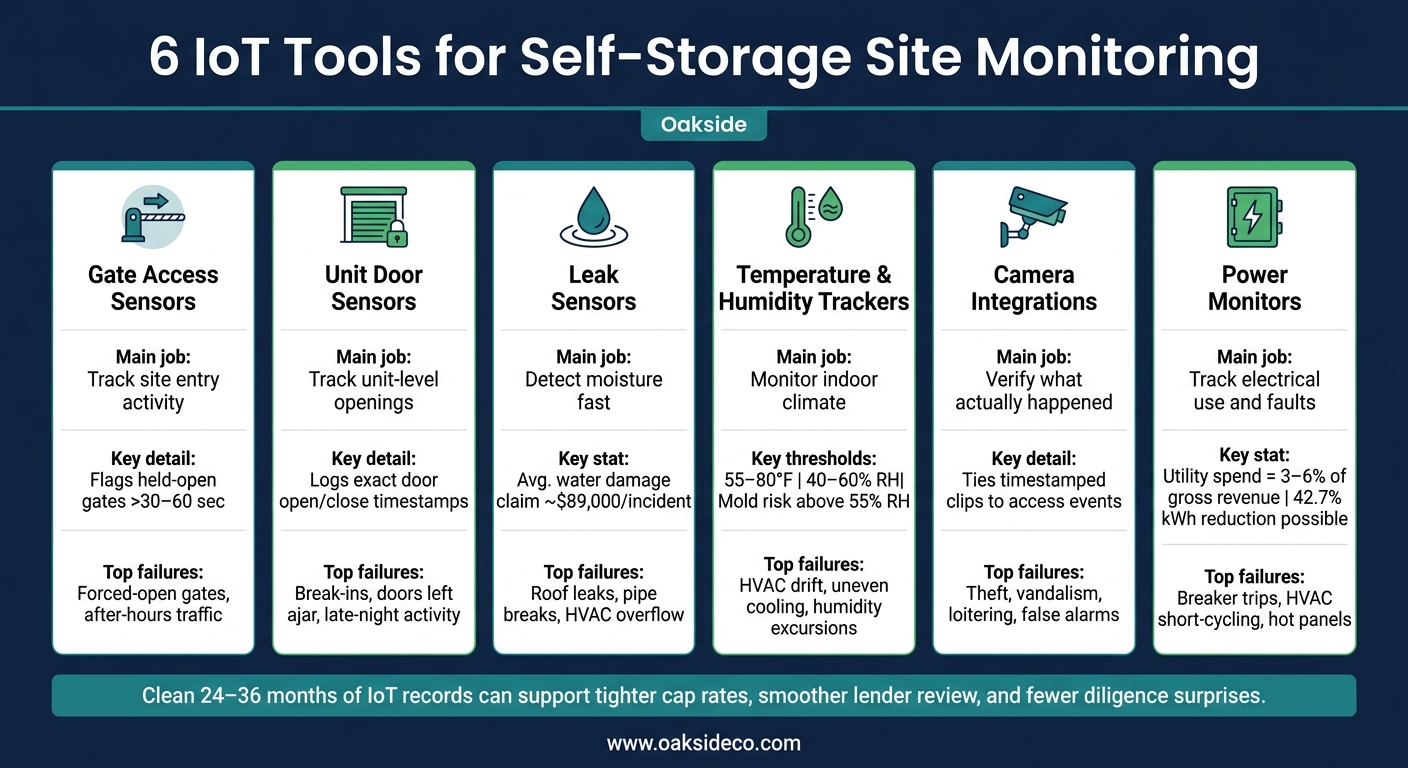
6 IoT Tools for Self-Storage Site Monitoring: At-a-Glance Comparison
Quick Comparison
| Tool | Main job | Common issue flagged | Best use in sale review |
|---|---|---|---|
| Gate access sensors | Track site entry activity | Forced-open gates, denied access, after-hours traffic | Shows site control and access patterns |
| Unit door sensors | Track unit-level openings | Break-ins, doors left open, late-night unit activity | Shows response history and unit security |
| Leak sensors | Detect moisture fast | Roof leaks, pipe breaks, HVAC overflow | Shows water-loss history and repair follow-up |
| Temperature/humidity trackers | Watch indoor climate | High humidity, HVAC drift, uneven cooling | Supports climate unit rent claims |
| Camera links | Confirm what happened | Theft, loitering, vandalism, false alarms | Shows incident handling and footage coverage |
| Power monitors | Track electrical use and faults | Outages, breaker trips, short-cycling, hot panels | Shows energy trends and capex risk |
Bottom line: I’d treat these tools as both a monitoring setup and a paper trail. The day-to-day alerts help limit damage, and the long-term logs help support pricing, reserves, and exit planning diligence later.
sbb-itb-09b4138
Why Monitoring Data Matters To Buyers, Lenders, And Operators
Buyers and lenders don’t want rough estimates. They want a record they can check for themselves – the same way they’d review a rent roll or a P&L.
That’s what IoT monitoring gives them. Every gate entry, door status change, temperature reading, leak alert, camera event, and power anomaly is logged with a timestamp and stored in a searchable record. Over time, those entries stop looking like random signals. They start to show how the site is run day in and day out. A facility can point to climate performance and gate traffic with hard numbers, not vague promises. That gives an underwriter something concrete to review.
The same data also helps owners make better calls during the hold period. Access logs show actual peak hours, which makes it easier to line up staffing with real traffic patterns. Door alert histories and leak detection logs can point to repeat problem spots, so maintenance teams can fix a drainage issue near one wall before it turns into a tenant damage claim. Climate trend data shows how hard HVAC systems are working, which helps owners decide if an equipment upgrade should hit this year’s budget or wait. Power monitoring adds another piece. It can show whether climate-controlled buildings are driving too much energy spend and where efficiency improvements may lift NOI before a sale. That matters when you’re planning both annual budgets and sale prep.
For buyers and lenders, this comes down to risk. Frequent forced door alerts, long climate excursions, or odd power draws usually point to something deeper – deferred maintenance, equipment stress, or a security issue that will find its way into the pro forma. Steady monitoring data cuts down those unknowns. It can help support tighter cap rates, smoother lender review, and fewer diligence surprises. Missing data tends to do the opposite. In practice, those gaps are often read as red flags, not harmless omissions. Each tool below adds another piece to that operating record.
1. Gate Access Sensors And Smart Entry Monitoring
Gate access sensors log every entry, denial, gate cycle, and timestamp. Start with the main vehicle gate. Then expand to secondary truck gates, multi-story lobby entrances, elevator call panels, and separate access groups for boat and RV areas. That setup keeps traffic segmented and makes heavy-duty gate wear easier to track. In practice, gate data is often the cleanest place to start when you want to measure access control and tenant movement.
Risk Or Failure Flagged
Gate sensors can flag held-open, forced-open, and repeated-denial events. If a gate stays open for more than 30–60 seconds, the system should trigger an alert for a possible tailgating event or a mechanical problem.
Repeated denied-access attempts can point to an old tenant code list or someone testing access without permission. Frequent odd-hour access may also signal unauthorized business use or unit living. These patterns don’t just point to one-off security issues. They can show weak day-to-day site discipline.
Alert And Data Outputs
Platforms should send real-time SMS, email, and in-app alerts for:
- Forced-open events
- Controller offline status
- Power loss
- After-hours access
Dashboards should show daily gate cycles, peak access windows, and the share of events that happen outside posted hours. Tenant-level logs connect each entry to a tenant ID and unit number. Most systems also export data as CSV or through an API into property management software, which helps with automatic credential activation and delinquent access control.
Use In Hold/Sale Underwriting
These logs can become part of the diligence file when a buyer or lender reviews site discipline. Metrics like average daily gate cycles per occupied unit, denied-access rate, gate downtime frequency, and the share of after-hours events give underwriters a direct view of how steady security operations are.
High after-hours activity or frequent error codes can point to enforcement gaps that change risk assumptions. On the flip side, clean gate logs and documented uptime can help support tighter cap rates and a smoother diligence process.
2. Individual Unit Door Sensors And Door-Open Alerts
After gate access, the next step is unit-level visibility. Gate sensors tell you who came onto the property. Unit door sensors tell you which unit opened and when. Most setups use magnetic contact sensors on the door and frame, and they can also flag tampering or forced entry.
Best-Fit Site Areas
Start with interior climate-controlled units, premium street-facing units, and remote upper-floor or back-wing units.
Risk Or Failure Flagged
Door sensors usually catch three things first: unauthorized access, doors left partly open, and after-hours openings.
Here’s why that matters. A roll-up door that isn’t fully latched can slip by on camera review. A contact sensor logs it right away. These sensors can also show repeat late-night openings tied to the same unit, which may point to unauthorized occupancy or unauthorized commercial use. And in a break-in, a log showing several nearby units opened within minutes can suggest coordinated activity instead of a one-off event.
Alert And Data Outputs
Modern systems can trigger an on-site alarm, email, and text the moment a unit door opens without a valid tenant access code. Low-battery alerts below 20% help keep sensors working as intended.
Exception reports also flag doors left open past a set threshold, while after-hours rules can mark any door activity between 11:00 p.m. and 5:00 a.m. In many cases, those same exception logs point to the first signs of hidden damage.
Use In Hold/Sale Underwriting
For buyers and lenders, this record helps show control, response speed, and loss prevention. Rent rolls can’t show that. Clean logs and quick responses can support tighter risk assumptions. On the flip side, unresolved alerts often push buyers toward higher reserves and added security upgrades.
3. Leak Detection And Water Intrusion Sensors
After access control, the next big failure point is water intrusion. In some U.S. market periods, commercial water damage claims have averaged about $89,000 per incident. For self-storage owners, that matters fast. Early leak detection helps protect units, cut claims, and reduce downtime.
Best-Fit Site Areas
Use spot sensors in mechanical rooms, fire-riser rooms, bathrooms, and near HVAC equipment. Rope sensors work well along corridor walls, foundation edges, plumbing runs, and below-grade areas.
Risk Or Failure Flagged
These sensors flag roof leaks, burst pipes, HVAC overflow, and groundwater intrusion. If alerts keep showing up in the same zone, that usually points to a drainage issue or roof capex need, not a one-off event.
Alert And Data Outputs
Most systems send real-time SMS, email, and app alerts the moment they detect moisture. Many operators use tiered alerts, with an instant text going to the on-site manager and a daily summary report sent to regional asset management to track repeat problem areas.
Timestamped, location-tagged logs show where the water entered. That gives staff a better shot at finding the source before more units are hit, and it also helps with claims, repairs, and capital planning.
Use In Hold/Sale Underwriting
A clean leak history helps support roof and drainage diligence. Repeated alerts in one building can point to deferred maintenance and may lead to retrades or higher reserves, impacting efforts to maximize NOI. Before-and-after logs can also help show that repairs fixed the problem.
Next, temperature and humidity sensors catch the slower damage that water alarms can miss.
4. Temperature And Humidity Trackers
Leak sensors catch sudden failures. Temperature and humidity trackers catch the slower kind of problem: small climate shifts that can damage inventory over time. In climate-controlled storage, that matters a lot. These sensors help confirm that units are staying within spec.
Best-Fit Site Areas
Put sensors in spots where climate issues tend to show up first:
- Interior corridors
- Exterior-wall units
- Upper floors
- Areas far from air handlers or dehumidifiers
Use tighter coverage in buildings with past HVAC complaints or known hot spots.
Risk Or Failure Flagged
Most climate-controlled units should stay near 55–80°F and 40%–60% RH. Once humidity gets above about 55% RH, the risk of mold and corrosion starts to climb. 60% RH is a common upper limit. These trackers help flag HVAC failures, weak ventilation, and uneven climate delivery across zones.
Alert And Data Outputs
A two-stage alert setup works well. Set a warning at 60%–65% RH and a critical alert at 70% RH for 30–60 minutes. That gives teams a chance to catch a problem before it turns into a bigger mess.
Daily or weekly reports should show average, minimum, and maximum readings by building and zone. That makes it easier to spot where conditions are slipping out of range and where HVAC or dehumidifier upgrades should land in the capital plan.
Use In Hold/Sale Underwriting
Clean climate logs help support the rent-premium case for climate-controlled units. Buyers and lenders can review hours out of range to test NOI and reserve assumptions. Package the logs by building and zone, note the repairs tied to excursions, and show stability after the fix. That record gives buyers and lenders a clear way to test NOI assumptions and reserve needs.
When a zone drifts out of range, camera review can help confirm the cause. Sometimes it’s HVAC performance. Sometimes it’s heavy access traffic. Sometimes it’s a physical issue in the space.
5. Camera Integrations And Remote Video Monitoring
When a gate, door, leak, or climate alert goes off, cameras show what actually happened. That matters. A sensor can tell you something changed. A camera can show whether it was a real issue, a false alarm, or a small problem turning into a bigger one.
That’s why cameras work as a verification layer, not just one more security add-on. They help confirm sensor alerts and create a searchable incident record. Later on, that record can support the operating file buyers, lenders, and operators lean on.
Best-Fit Site Areas
Start with the places where activity matters most and where problems tend to show up first:
- Entry and exit gates
- Drive aisles
- Perimeter fencing
- Loading zones
- The office or point-of-sale area
Cameras are even more useful in areas where staff don’t check often in person or where after-hours issues are more likely. A lot of setups pair HD or 4K cameras with license plate capture at gates, which lets operators connect a vehicle to a specific access event.
Risks Or Failures Flagged
Cameras give you visual proof that sensor data alone can’t provide. They can flag theft, vandalism, loitering, vehicle damage, and whether an access alert was a true event or just noise.
That visual record can also show patterns. If footage keeps showing after-hours movement near the same corner of the perimeter, that’s a sign something may need attention. Maybe the lighting is poor. Maybe the fencing has a weak spot. Maybe surveillance coverage needs to shift.
Alert And Data Outputs
Most systems provide motion-triggered clips, time-stamped recordings, live remote feeds through a mobile app or web dashboard, and zone-breach alerts when activity happens outside business hours.
The most useful setup ties those time-stamped clips to access logs. That makes investigations, claims, and management reviews much easier. Instead of guessing what happened, teams can pull the clip and match it to the event record.
Use In Hold/Sale Underwriting
During diligence, footage matters because it shows how alerts were handled, not just whether they happened. Buyers and lenders want searchable footage tied to access events, incident response, and coverage records.
Sellers who can produce that record tend to show less perceived risk. On the flip side, missing footage or gaps in coverage can slow diligence. It helps to package video, gate, and door logs together so reviewers can see both coverage and response discipline.
6. Power And Energy Monitoring Devices
Cameras and sensors tell you what’s happening on-site. Power monitors tell you how the property is performing. That makes power data useful in two ways: as an operations tool and as a record for diligence. These devices track electrical use at the circuit or panel level, which helps owners catch trouble before it turns into an outage or equipment failure.
Best-Fit Site Areas
Use power monitoring in climate-controlled buildings, mechanical and electrical rooms, main panels, exterior lighting, and gate circuits. If power goes down or loads start acting oddly in those areas, tenants feel it fast. Security can slip, access can fail, and the site can get messy in a hurry.
Risk Or Failure Flagged
Power monitors can flag HVAC short-cycling, rising amperage, phase imbalance, repeated breaker trips, and partial or full building outages. They’re also useful on circuits that feed cameras, access control, alarms, and IT equipment.
The payoff can show up fast. A seven-site rollout in NY, NJ, and PA recorded a 42.7% kWh reduction and $24,988 in three-month savings, along with a 28% drop in HVAC maintenance costs. That’s a strong sign that power anomalies often point to mechanical stress early, before the issue gets worse. This kind of data also helps during the hold period and makes sale prep easier.
Alert And Data Outputs
Most systems track:
- kW demand
- kWh
- voltage
- amperage
- power factor
- runtime
Set informational, action, and critical alerts for sustained anomalies, total power loss, or unsafe panel temperatures. Then route those alerts by email, SMS, or app. You can also compare energy intensity across sites to spot outliers. One property may look fine on the surface, but the power data can tell a different story.
Use In Hold/Sale Underwriting
Utility costs usually run 3%–6% of gross revenue at well-run self-storage facilities. Clean power data that shows steady use, no major outages, and early maintenance action can support tighter underwriting and cut down on retrade requests.
On the flip side, frequent breaker trips, hot panels, or high kWh intensity can trigger questions about capex reserves. When possible, present 12–24 months of normalized, end-use data. That gives buyers a clearer view of operating patterns and makes it easier to separate a one-off spike from a site-level issue.
The comparison tables below break down placement, alerts, and underwriting use for each tool.
Comparison Tables For The 6 Tools
Use these tables to compare coverage, install effort, and underwriting value at a glance. This isn’t just about monitoring. It’s about building a record that buyers and lenders can actually underwrite. Each table shows where a tool fits and the failure mode it documents best.
Unit Alarm Types: Motion vs. Door Sensor
Both alarm types protect individual units, but they do different jobs. Door sensors log when a door opens without permission. Motion sensors pick up movement inside a unit, which helps when someone gets in without opening the door or was already inside. In practice, the best setup is both together.
| Feature | Motion Alarm | Door Sensor |
|---|---|---|
| Detection method | PIR or microwave sensor detects movement | Magnetic reed switch detects door open/close |
| Best placement | Interior wall or ceiling of high-value units | Top or side of roll-up door and frame |
| Best at catching | Loitering, wall breaches, internal activity | Door-state changes tied to entry events |
| Install complexity | Moderate – requires aiming and sensitivity tuning | Low – mount magnet and switch, confirm alignment |
| Access control integration | Via alarm panel or IoT gateway | Direct integration with PMS and access control |
| Data usefulness | Flags suspicious activity patterns | Logs precise door events tied to gate access records |
Leak Detection: Spot vs. Rope/Cable vs. Flow-Based
Each type covers a different span. Spot sensors watch one point. Rope sensors watch a run. Flow-based systems add a different kind of value because they can catch hidden line breaks and odd water use that spot or rope sensors may miss.
| Feature | Spot Sensor | Rope/Cable Sensor | Flow-Based Monitor |
|---|---|---|---|
| Coverage area | Single location | Anywhere along cable length | Entire water line or zone |
| Best placement | Under HVAC units, sprinkler risers, low spots | Hallway perimeters, pipe runs, raised floors | Main water line or branch feeds |
| Best at catching | Pinpoint leaks at known risk points | Slow seepage along walls or floors | Hidden line breaks, abnormal consumption |
| Typical cost | $30–$120 per unit | $80–$300+ for cable and controller | High – plumbing changes required |
| Install complexity | Low | Moderate – cable routing, zoning | High – requires cutting into existing lines |
| Data type | Event-based alert (leak/no leak) | Event-based alert along cable zone | Continuous time-series consumption data |
Video Systems: Analog DVR vs. IP vs. Cloud-Managed
The main split here is remote access and data value, not image quality. That’s the part people often miss.
| Feature | Analog DVR | IP / NVR | Cloud-Managed |
|---|---|---|---|
| Resolution | Lower-resolution | 1080p to 4K+ | 1080p to 4K+ (camera-dependent) |
| Remote access | Limited | Good, with network setup | Native – browser or app, no VPN needed |
| Camera placement | Constrained by coax runs | Flexible via Ethernet, PoE, fiber | Flexible – same as IP |
| Install complexity | Low for legacy retrofits | Moderate – requires network design | Moderate – requires reliable uplink bandwidth |
| Analytics support | Minimal | Motion search, smart playback | People counting, vehicle detection, loitering alerts |
| Due diligence value | Basic footage, limited incident records | Timestamped clips matched to access events, searchable logs | Shareable incident records, event-to-footage matching, multi-site dashboards |
Once camera events are tied to access logs, power data gives you the operating layer.
Energy Monitoring: Panel vs. Circuit vs. Device Level
Granularity drives usefulness. Panel-level data shows what the site costs to run. Circuit-level data shows why. Device-level data shows exactly which piece of equipment is causing the issue.
| Feature | Panel-Level | Circuit-Level | Device-Level |
|---|---|---|---|
| Monitoring scope | Aggregate load at main or sub-panels | Individual branch circuits | Single devices or equipment |
| Best placement | Main or sub-panels | Within panels, per circuit | Smart plugs, on-board meters, hard-wired equipment |
| Best at identifying | Total kWh, demand peaks, service capacity | HVAC zone overuse, lighting anomalies, circuit-level waste | Failing equipment, off-hours operation, individual runtimes |
| Install complexity | Low | Moderate to high | Low for plug-in loads; high for hard-wired equipment |
| Data volume | Low | Medium | High |
| Underwriting value | Utility cost benchmarking, operating expense assumptions | Before/after curves for LED or HVAC upgrades, efficiency gain documentation | Reserve planning, maintenance decisions, vendor performance guarantees |
Next, set the climate thresholds that turn these readings into actionable alerts.
Climate Control Thresholds And Alert Benchmarks
Use the thresholds below as your default operating range, then tune them based on the building envelope and tenant mix. The numbers by themselves aren’t the point. What matters is when they show up as alerts, trends, and exceptions.
Treat humidity as the main risk signal. If readings keep going above 55% RH, that’s a maintenance flag.
Severity comes down to duration, frequency, and pattern. A short humidity bump when doors open usually isn’t a big deal. Readings that stay high for several hours are a different story. If temperature drifts above 80°F while the HVAC is running, that’s a cooling issue. Common causes include a compressor fault, refrigerant loss, a clogged filter, or a failed fan. If humidity keeps climbing while temperature stays stable, dehumidification may be falling behind even if the cooling cycle looks normal.
| Alert Level | Temperature | Relative Humidity | Likely Signal |
|---|---|---|---|
| Warning | Above 78°F or below 55°F | Above 55% RH | Drift worth checking; schedule a service visit |
| Critical | Above 82°F or below 50°F | Above 65% RH | Likely equipment failure; escalate at once |
| Rapid Change | 5°F+ change within one hour | Sudden spike | Door left open, seal failure, or HVAC fault |
Mold risk starts building before tenants notice anything. Humidity data becomes much more useful when you read it next to leak sensor alerts and tenant complaint logs. A rising humidity trend paired with a recent leak event or odor report is a stronger signal than either one on its own.
Also watch for wide temperature swings and odd HVAC runtime. Constant cycling caused by poor insulation, thermostat failure, or frequent door openings can drive up utility costs even when the building never quite hits target conditions. Trend data across weeks or months helps separate actual cooling demand from equipment inefficiency. That difference matters when you’re benchmarking utility spend or planning capital improvements. These patterns also feed into hold-period and underwriting inputs.
Using IoT Data In Hold/Sell Planning And Underwriting
The six tools covered in this article do more than help with daily operations. Over time, they build a verifiable operating record that owners can use to decide how to position an asset for a hold or sale. Gate access logs, door-open histories, climate histories, leak incidents, and energy trends each show one part of the picture. Put together, they show how the facility performs in practice.
That matters during a sale. Buyers want to test underwriting, reserve assumptions, and risk. Clean 24–36 month records can strengthen sale positioning because they give buyers something concrete to review instead of guesswork. The next step is turning that operating record into proof that’s ready to share.
During the hold period, this same data helps owners spend with more precision. If door logs show repeated events in one building, that’s a clear signal to target cameras or lighting there. If energy data shows one building pulling too much power, it may point to HVAC or lighting issues. When those fixes are documented, owners can show before-and-after proof that supports valuation. That’s why the final pre-sale months matter so much.
In the 12–24 months before sale, make sure systems are active, time-synced, and logging the right way. Then turn the raw data into monthly building summaries, resolved incident logs, and project histories tied to sensor-detected issues. Buyers don’t want a pile of disconnected exports. They want a short, usable operations and risk summary they can underwrite against. For sale prep, Oakside Co can turn these records into a clean disposition package.
| Data Type | Sale Signal | How It’s Used in a Sale |
|---|---|---|
| Gate access logs | Tenant and staff activity patterns | Validates utilization and operating discipline |
| Door-open alerts | Unit-level anomaly patterns | Flags security events or maintenance exceptions |
| Climate histories | Temperature and humidity compliance by zone | Supports climate-premium rents and reduces damage risk |
| Leak and incident records | Water intrusion frequency and severity | Identifies deferred maintenance and insurance concerns |
| Energy trends | kWh consumption by building or system | Improves NOI forecasting and validates efficiency capex |
Where Oakside Co Fits In
Once the data is collected, the next job is getting it ready for diligence. Oakside Co doesn’t provide IoT hardware or software. It’s a national commercial real estate advisory firm focused on self-storage and boat & RV assets, and it comes in after collection.
Oakside helps owners turn gate logs, unit-door alerts, climate records, leak alerts, camera events, and power data into diligence exhibits buyers and lenders can actually use. That can include climate-compliance summaries, incident-rate trends, and response-time logs.
A well-prepared virtual data room with structured documentation can shorten due diligence by 30 to 60 days. That can cut deal fatigue and lower the odds of a transaction breaking down late in the process. This is the point where organized reporting becomes transaction-ready.
"In competitive processes, sellers who present clear, organized IoT records frequently see fewer surprises in diligence and less pressure for last-minute price chips." – Nolen Masserman, Managing Director at Oakside
That focus helps sort out which metrics matter most in underwriting, from climate uptime to gate activity and power reliability. In plain English, Oakside helps translate raw data into the numbers buyers and lenders underwrite against.
For owners putting together a sale file, clean records remove friction during diligence. When timestamps line up across systems and alert logs follow one consistent format, the data is easier to review and easier to trust when diligence starts.
Conclusion
IoT monitoring is more than a stack of security devices. Used well, it becomes a written record of how a site runs day to day.
That matters because water damage makes up about 35% of all self-storage claims, and theft is the second most common source of claims. IoT tools help on both fronts. They can spot issues early, track what happened, and create timestamped records that lenders and buyers can review during diligence and valuation. But the data only helps if someone actually checks it and keeps records.
A monthly review is a good place to begin. If you’re not yet using IoT data to guide decisions, start by reviewing access logs, climate data, and incident alerts each month. If an alert leads to a repair, document the fix. Detection plus a written response turns sensor data into operating history.
Even 24 to 36 months of clean logs can help show operating discipline. Owners who treat monitoring data like a business record put themselves in a stronger position for self-storage valuations. The data means more when it becomes part of an operating story you can back up.
FAQs
Which IoT tools should I install first?
Start with the tools that do the most for day-to-day performance, visibility, and security. That usually means cloud-based property management software and automated gate access systems first, since they make remote management easier and support more self-serve operations.
Then layer in individual unit alarms and smart locks. After that, add leak sensors and energy-efficient HVAC controls to cut costs, support NOI, and show buyers the kind of scale they like to see.
How long should I keep monitoring data before a sale?
Keep at least three years of profit and loss statements and tax returns, along with 24 months of historical occupancy data by unit type.
That gives buyers and lenders a better read on stability instead of forcing them to judge the property from one moment in time. It also helps to organize these records in a virtual data room before listing. Done well, that can speed due diligence and shorten the transaction timeline by 30 to 60 days.
Can IoT logs reduce insurance and diligence issues?
Yes. IoT logs create a clear digital paper trail from automated sensors and utility alerts. That gives owners a better shot at finding and fixing issues like leaks or maintenance defects before they turn into expensive repairs or legal risk.
As Nolen Masserman, Managing Director at Oakside, notes, organized data and maintenance transparency can cut down on surprises during due diligence, support a smoother transaction, and strengthen buyer confidence.