
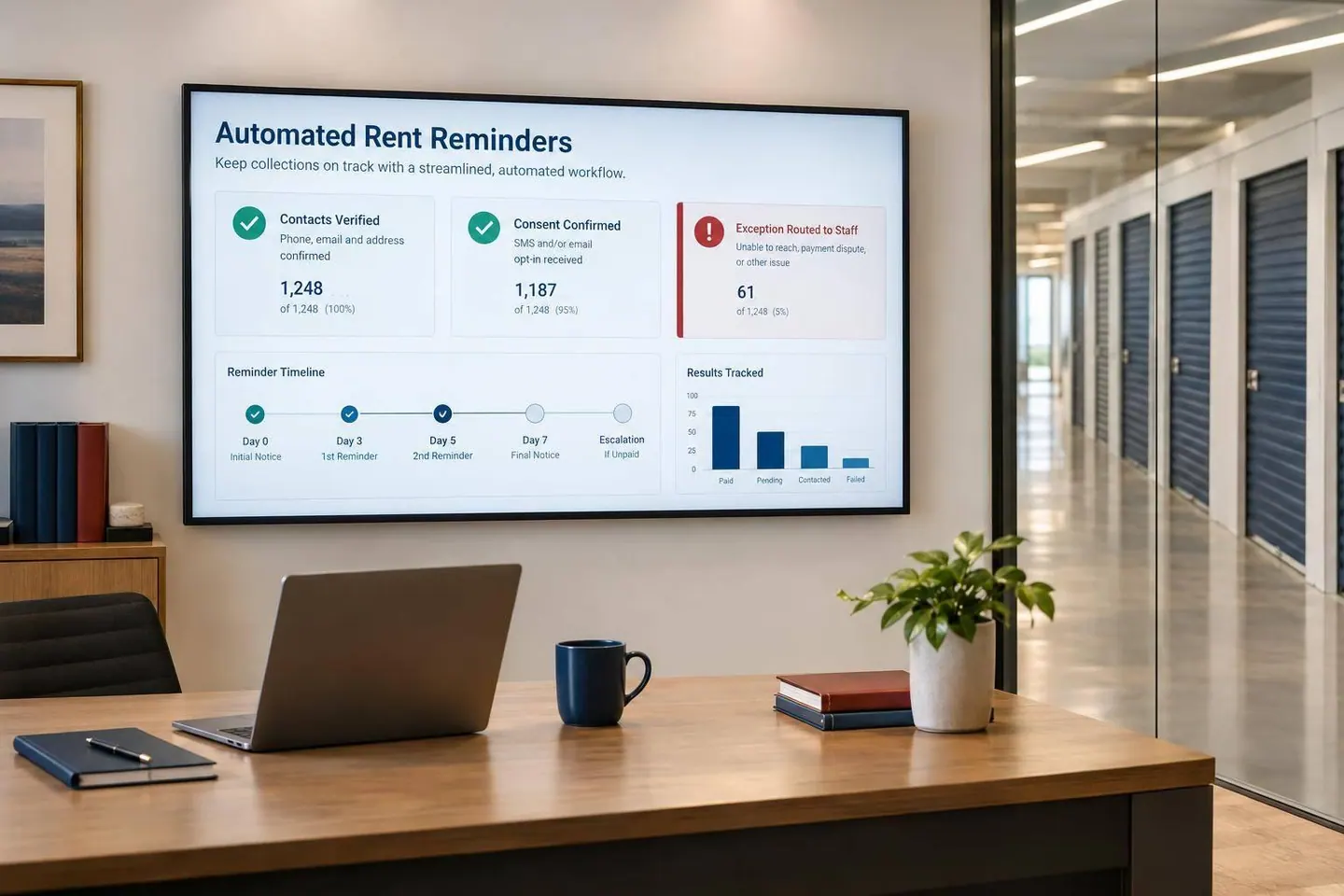
Automated rent reminders help storage operators follow up without sending every message by hand - but they don’t guarantee payment. A simple schedule starts with an email 3–7 days before rent is due, followed by a due-date reminder only if the balance remains unpaid.
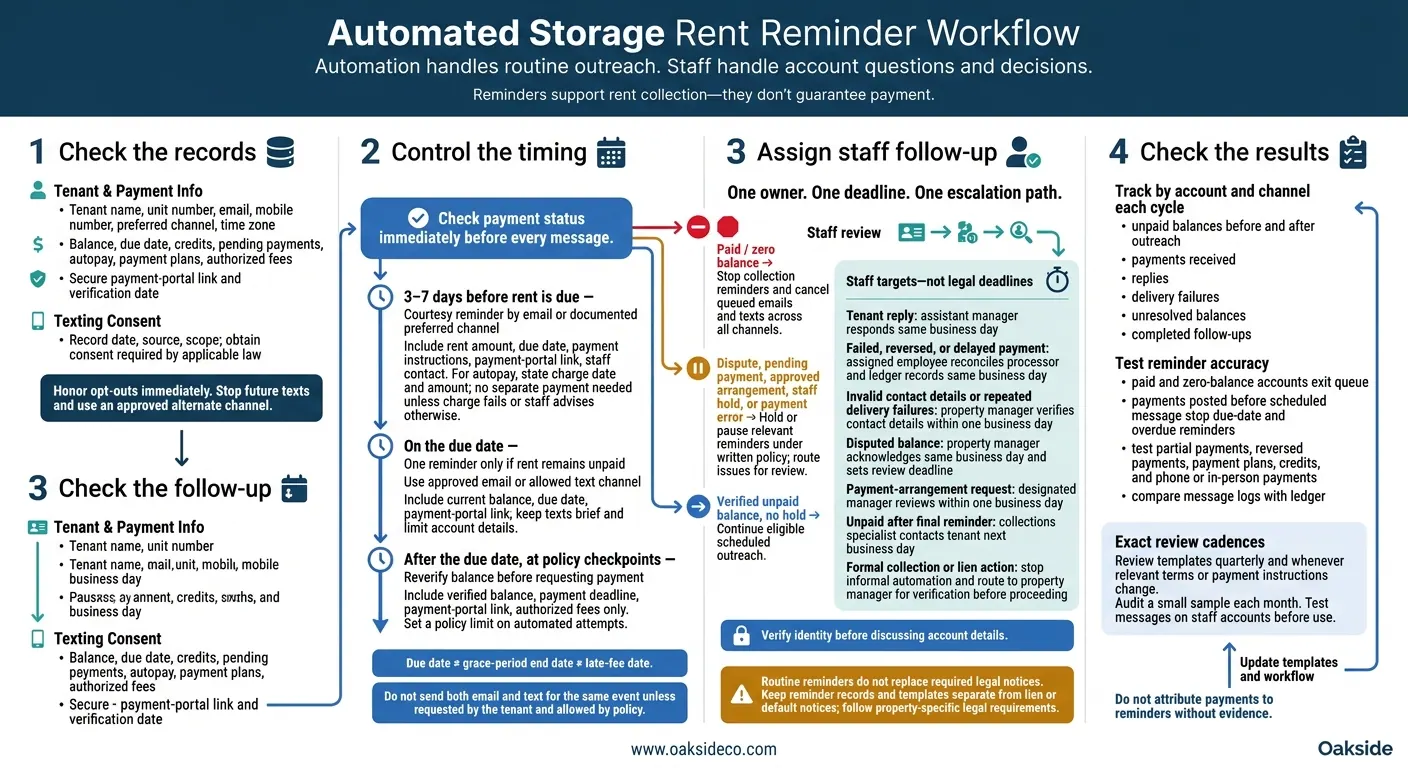
For self-storage, boat, and RV facilities, the process comes down to four steps:
- Check the records: Verify balances, contact details, channel preferences, and required texting consent. Honor opt-outs.
- Control the timing: Check payment status before each message, stop reminders when the balance clears, and pause for disputes or payment issues.
- Assign staff follow-up: Give replies, failed deliveries, and unresolved accounts an owner and a deadline. Keep routine reminders separate from required legal notices.
- Check the results: Track payments, delivery failures, and completed follow-ups. Test reminder rules and review message accuracy.
Automation handles routine outreach. Staff handle the account questions and decisions that need review.
Automated Storage Rent Reminder Workflow
Verify Contact Details, Consent, and Account Balances
Start with a setup checklist: tenant name, unit number, email, mobile number, preferred channel, and time zone. Check the lease and ledger for rent, the due date, credits, pending payments, autopay, payment plans, and late fees. Add the secure payment-portal link and record the verification date. Accurate records help prevent incorrect balances and messages sent to the wrong person. They also determine who gets each reminder and when.
Record the date, source, and scope of texting consent, and obtain the consent federal and state law requires. A mobile number alone isn’t enough. Update contact changes immediately across both payment and messaging systems.
Treat opt-outs as immediate system updates. Stop future texts when a tenant clearly withdraws consent, including through a STOP reply. Record the affected number and request date, then move the tenant to an approved alternate channel.
Keep Reminders Separate From Legal Notices
Create approved templates that include the payment deadline, contact number, and office hours. Keep texts short and factual, and set delivery windows based on the tenant’s local time. Assign staff to handle replies and failed deliveries. Make clear who can change balances, waive fees, approve payment plans, and send formal notices.
Use the same checks across accounts and properties, while keeping property-specific settings for lease terms, fees, and state requirements. Keep reminder templates and delivery records separate from lien or default notices. Use the wording, deadlines, consent, and delivery methods required for each property.
Once records and rules are in place, schedule reminders by due date and payment status.
Once tenant preferences and consent are confirmed, set a reminder schedule that follows the lease, those preferences, and applicable law. Check payment status immediately before every message. When payment is confirmed, stop collection reminders and cancel queued emails and texts across all channels. After setting the schedule, assign staff to review replies and exceptions.
| Delivery point | Channel | Message purpose | Required account details |
|---|---|---|---|
| 3–7 days before rent is due | Email or documented preferred channel | Courtesy reminder or autopay notice | Rent amount, due date, payment instructions, payment portal link, staff contact |
| On the due date | Approved email or allowed text channel | Unpaid rent reminder | Current balance, due date, payment portal link; brief text-only details |
| After the due date, at policy checkpoints | Approved channel | Payment request for verified balance | Verified balance, payment deadline, payment portal link, authorized fees only |
3–7 Days Before: Send an Advance Reminder
Send an email if it matches the tenant’s documented preference. State the rent amount in U.S. dollars and keep the tone courteous - rent isn’t late yet.
For scheduled autopay, include the charge date and amount. Explain that no separate payment is needed unless the charge fails or staff advises otherwise.
On the Due Date: Remind Tenants With Unpaid Rent
Send one brief reminder only to accounts that remain unpaid. Hold reminders for pending transactions or approved arrangements under the written policy.
Use text only when permitted and in line with documented preferences. Identify the facility, limit account details, and include a payment portal link. Don’t send both an email and a text for the same event unless the tenant requested both and policy allows it.
After the Due Date: Check Balances Before Sending Reminders
At each checkpoint, pause reminders for disputes, arrangements, staff holds, or payment errors. Treat the due date, grace-period end date, and late-fee date as separate milestones. Include fees only when both the lease and applicable law authorize them.
Set a policy limit on automated attempts instead of repeating reminders indefinitely. If the account still doesn’t clear, staff should take over the file.
Route unresolved replies, failed deliveries, and disputed balances to staff for review.
Give each exception one owner, one deadline, and one escalation path. Prompt follow-up after a scheduled reminder, payment error, or bounced message helps keep collections on track. When a reminder produces a reply, payment issue, or delivery failure, route the account to staff immediately. The response times below are staff targets, not legal deadlines.
| Condition | Auto action | Staff owner | Record | Escalate when |
|---|---|---|---|---|
| Tenant reply | Pause reminders and open a task | Assistant manager: verify identity, check the ledger, and respond the same business day | Reply, verification, outcome | Response deadline passes or request exceeds authority |
| Failed, reversed, or delayed payment | Pause reminders until status is confirmed | Assigned employee: reconcile processor records and the ledger the same business day | Transaction ID, amount, status, correction | Records remain unreconciled, reversals recur, or payment is disputed |
| Invalid contact details or repeated delivery failures | Pause messages to that destination and flag the account | Property manager: verify contact details within one business day | Failure code, verification source, update date, channel, delivery status, consent or preference changes | No verified channel is available or recipient is uncertain |
| Disputed balance | Pause disputed-balance reminders | Property manager: acknowledge the same business day and set a review deadline | Evidence reviewed, decision, notification | Review deadline passes or a legal question arises |
| Payment-arrangement request | Pause standard escalation pending review | Designated manager: review within one business day | Terms, approval, installment dates and amounts, payment method, tenant acknowledgment | Terms exceed policy or an installment is missed |
| Unpaid after final reminder | Open a staff follow-up task | Collections specialist: contact tenant the next business day | Balance date, contact outcome, promised payment date, next review date | Nonpayment continues at the policy checkpoint |
| Formal collection or lien action | Stop informal automation and route for review | Property manager: verify balance, notices, deadlines, and procedures before proceeding | Notice history, ledger, approvals, service records | Any lien, lockout, legal, or third-party collection step is proposed |
Use this table to set priorities for daily review and escalation.
Check Replies, Payment Errors, and Delivery Failures
Confirm the recipient’s identity before discussing account details. If a tenant says they’ve paid, compare the processor record with the ledger before sending another payment request. Record the transaction reference and outcome. Never request full card or bank details by email or text.
For undelivered messages, check the signed rental record and recent verified communications. Use another channel only with authorization, and never disclose delinquency to an unverified contact. Record the source of corrected contact details and follow approved opt-out procedures.
Review Disputes, Payment Requests, and Unpaid Accounts
For disputes, compare the lease, fees, credits, and payment history, then give the tenant an itemized explanation.
For payment requests, get approval before promising terms. Document installment amounts, dates, payment method, missed-payment consequences, and tenant acknowledgment. Update reminders to match the approved arrangement.
During follow-up, state the balance as of a specific date, invite the tenant to report payments or account errors, and record any promised payment date. State-specific delinquency and notice rules still apply; a routine reminder does not replace a required notice. Before formal escalation, send the account to the property manager to verify the balance and required notice procedures.
After staff follow up on exceptions, check whether reminders reduce outstanding balances and manual follow-up. Track results by account and channel each cycle: unpaid balances before and after outreach, payments received, replies, delivery failures, unresolved balances, and completed follow-ups. Compare cycles by channel, but don’t credit a reminder for a payment without proof.
Test that paid or zero-balance accounts leave the reminder queue. Make sure payments posted before a scheduled message stop both due-date and overdue reminders. Test partial payments, reversed payments, payment-plan accounts, credits, and payments made by phone or in person. Check message logs against the ledger to spot unrecorded payments, incorrect payment requests, and reminders sent after a balance clears.
Use the results to update reminder templates and staff workflow. Review templates quarterly and whenever lease terms, fees, due dates, payment methods, or payment instructions change. Test messages on staff accounts before use. Train staff to record timestamps, account status, next actions, and completion dates in consistent contact fields. Audit a small sample each month.
How often can I remind tenants without overmessaging?
Send rent reminders on a set schedule instead of sending frequent, one-off messages. Automate them to keep communication consistent and cut down on manual follow-ups. This helps tenants know what to expect and keeps rent collection organized and professional.
How should I handle tenants with no approved contact channel?
If a tenant has no approved email or text contact, use another method on file - usually a phone call or mailed notice. Send a reminder before rent is due, follow up immediately after the due date, and escalate at 30, 60, and 90 days past due. Record each contact attempt and the next steps.
If approved channels don’t reach the tenant, treat it as a process exception. Prioritize manual outreach until the tenant updates their contact preferences in your management system.
How can I tell whether reminders improve collections?
Compare billed rent with cash actually received. Track realized rent - the payments collected after accounting for delinquency and write-offs - to check whether automated reminders are helping you collect more rent and grow revenue.
Set clear performance triggers, such as collected rent falling more than 5% below forecast. When a gap appears, review the data to see whether delinquency or payment timing is behind it.