If you set one move-in rate for the whole property, you’re probably leaving rent on the table. I’d treat move-in pricing as a direct driver of achieved rent, NOI, and sale value – not just a way to fill space.
Here’s the short version:
- I’d price by unit type, not by total facility occupancy
- I’d use occupancy triggers to decide when to change rates
- I’d keep promos short and category-specific
- I’d set hard rate floors so managers don’t cut too far
- I’d review pricing weekly using unit type, occupancy, season, and local comps
That matters more in a softer market. The article notes that by early 2024, national move-in rents were down about 15% from peak levels, while average stabilized occupancy was about 85%. So filling units at any price can hurt future income if those rates stick.
What I take from this is simple: a 10×10 climate-controlled unit at 90% occupancy should not be priced the same way as a slow non-climate unit on an upper floor. And a discount used in January should not still be live in July with no stop date.
A simple framework looks like this:
| What I’d check | What it tells me |
|---|---|
| Unit type | Whether the product deserves a premium or discount |
| Unit-specific occupancy | Whether that unit group can support a higher rate, a hold, or a promo |
| Season | Whether demand is strong or soft |
| Local market position | Whether I should sit at premium, middle, or value pricing |
I’d also watch the gap between physical occupancy and collected income. A property can show 92% occupancy but collect far less than expected if too many tenants came in on weak rates or heavy concessions. That gap is where income gets lost – and where buyers start asking hard questions.
So the core idea is this: price each unit group on its own demand, keep discounts tight, and protect your floor. That’s how I’d move from chasing occupancy to building better income.
2. Set Move-In Rates by Unit Type and Occupancy
Price by size, features, and location within the facility
Start with a base rate tied to what the unit actually gives the renter. Size matters, but it’s only part of the story. Climate control, access style, floor level, placement in the property, covered parking, and power hookups can all change what someone is willing to pay.
Think of it as a pricing ladder built around convenience and use case. A renter comparing two 10×20 units isn’t just looking at square footage. They’re weighing things like easier access, protection from heat and humidity, or whether the unit works for an RV or boat.
For example, one facility might charge $120/month for a standard 10×20 unit, $170/month for an interior-access climate-controlled 10×20, and $200/month for a drive-up, climate-controlled 10×20. That gap comes from access and temperature control, not size alone.
Use these ranges to map out your ladder:
| Unit Category | Rate Range (per sq. ft./month) |
|---|---|
| Climate-controlled interior | $1.20 – $2.00 |
| Non-climate interior | $0.80 – $1.40 |
| Drive-up | $0.70 – $1.20 |
| Covered RV/boat parking | $0.40 – $0.80 |
| Uncovered parking | $0.20 – $0.50 |
Keep premium units in their own bucket and price them on their own terms. If non-climate units are moving slowly, that shouldn’t pull down the rate for climate-controlled space. Once those base rates are set, occupancy shows you when to change them.
Use unit-specific occupancy triggers
After you set the base rate by features, use occupancy to fine-tune pricing. The big idea here is simple: track occupancy by unit type, not just by total property occupancy.
A facility can look full on paper and still have one category lagging. That’s why unit-level data matters.
Use these occupancy bands to guide pricing moves:
| Occupancy Band (by unit type) | Pricing Action |
|---|---|
| Mid- to high-90s | Raise move-in rate; eliminate or shorten discounts |
| Low- to mid-90s | Hold rate; reduce concession length |
| 80%–89% | Maintain rate; monitor absorption pace |
| Below 80% | A category-specific promotion |
When a unit type is tight, push rate or trim discounts. When absorption is soft, use promotions only for that category. Seasonality and your spot in the market shape how far you should go with each move.
sbb-itb-09b4138
3. Manage Seasonality, Market Position, Discounts, and Rate Floors
Adjust rates by season and local market position
Once unit-level occupancy is in good shape, seasonality and market position should guide how hard you push pricing.
Self-storage demand usually peaks from April through September and slows in late fall and winter. Your pricing should move with that pattern.
In June, unit types with high occupancy should usually hold full rate and drop concessions first. Push the street rate toward the top of your local range and let demand do its job. During slower months, use targeted, time-limited promotions only for unit types that are lagging.
Pick a clear position in the market:
- Premium
- Mid-market
- Value
Then line up your street rates and marketing with that choice. Check that position twice a year, especially if a new facility opens nearby.
That same market position should shape how long discounts last and how low rates are allowed to fall.
Set short discount windows and firm rate floors
Keep introductory discounts simple and time-bound, like first month free, because lower effective rent cuts into NOI and property value. Open-ended specials, such as a lifetime discounted rate, chip away at revenue by locking in a lower effective rent and signaling that the posted rate isn’t the actual rate.
One common problem is discount creep. A discount meant to fill a slow unit type in January is still running in July because nobody set an end date. The fix is simple: build a sunset rule into your policy. For example, no discount lasts more than 60 days, and all concessions end on the next rent increase notice.
Rate floors set the lowest move-in price allowed for each unit type. Set them by unit type in monthly dollars and dollars per square foot, so managers have a clear line they can’t cross, even when pressure to fill units starts to build. For example, if a 10×10 climate-controlled unit has a floor of $1.50/SF/month, the minimum move-in price is $150/month, even if a concession applies.
| Unit Type | Unit Size | Rate Floor ($/SF/month) | Rate Floor ($/month) | Example Street Rate |
|---|---|---|---|---|
| Climate-controlled interior | 10×10 (100 SF) | $1.50 | $150 | $170 |
| Drive-up | 10×20 (200 SF) | $1.25 | $250 | $280 |
These floors help protect achieved rent and stop pricing from drifting into levels that are hard to support later. The next section brings seasonality, market position, discounts, and floors into one decision framework you can use unit by unit.
4. A Simple Decision Framework for Setting Move-In Rates
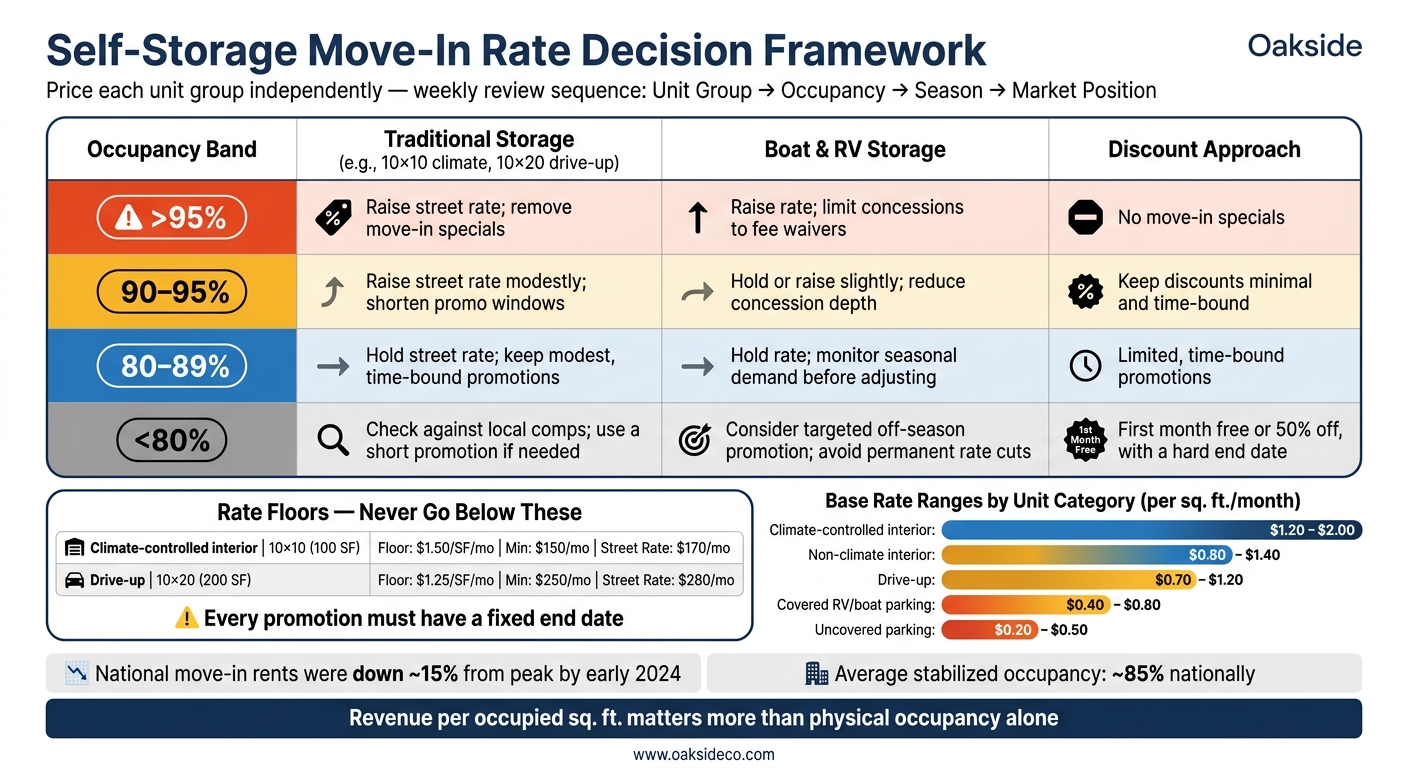
Self-Storage Move-In Pricing: Occupancy-Based Action Framework
Evaluate unit type, occupancy, season, and market in order
Use the same weekly sequence every time: unit group, occupancy, season, market position.
Start by pricing each unit group on its own demand curve. After you define the group, check current physical occupancy and look at recent move-ins and move-outs over the last 30 and 90 days.
Next, add seasonality. In late spring, a group above 90% occupancy can usually support a rate increase. In winter, it often makes more sense to hold the rate and use a short promo instead of making a permanent cut.
Then compare the street rate to the local rate for similar-quality units. Your market position should stay fixed and should guide the rate.
This sequence turns pricing into a weekly system instead of a one-time guess.
Pricing action table by occupancy band and unit type
Use this table to turn the weekly review into action.
| Occupancy Band | Traditional Storage (e.g., 10×10 climate, 10×20 drive-up) | Boat & RV Storage | Discount Approach |
|---|---|---|---|
| >95% | Raise street rate; remove move-in specials | Raise rate; limit concessions to fee waivers | No move-in specials |
| 90–95% | Raise street rate modestly; shorten promo windows | Hold or raise slightly; reduce concession depth | Keep discounts minimal and time-bound |
| 80–89% | Hold street rate; keep modest, time-bound promotions | Hold rate; monitor seasonal demand before adjusting | Limited, time-bound promotions |
| <80% | Check it against local comps and use a short promotion if needed | Consider a targeted off-season promotion; avoid permanent rate cuts | First month free or 50% off, with a hard end date |
Two guardrails matter here: never go below the floor, and give every promotion a fixed end date. If a discount was supposed to run for 30 days, it shouldn’t still be live months later.
These pricing moves feed straight into achieved rent, NOI, which are critical components of self-storage exit planning, and how buyers value the asset.
5. How Move-In Pricing Affects NOI, Buyer Views, and Asset Value
How move-in rates shape achieved rent and NOI
Once pricing rules are set, the next step is simple: look at what they do to collected rent and asset value.
Physical occupancy can make a property look stronger than it is. A facility showing 92% occupancy may collect rent on only 78% to 80% of potential income after concessions, below-market move-in rates, and delinquency. That spread between reported occupancy and collected income is where pricing discipline either holds up or falls apart.
The impact hits NOI right away. Self-storage assets are valued by dividing stabilized NOI by a cap rate, so every dollar lost in effective rent cuts value. This is why sensitivity testing is critical during underwriting. Put plainly, revenue per occupied square foot matters more than physical occupancy by itself.
That’s the operating side of the story. The sale side matters too.
Why buyers pay attention to pricing discipline
Buyers don’t stop at headline occupancy. They look at achieved rent, economic occupancy, and concession history because those figures show whether current NOI can hold up or whether it was padded by one-time discounts.
If a big share of tenants moved in on steep discounts and there’s no clear path back to market rent, buyers may assume more vacancy risk and slower rent growth. When that happens, value can tighten.
Good pricing discipline gives buyers a cleaner story to underwrite. You can see it in the rent roll, and it can support stronger bids.
Oakside uses that pricing history to help frame sale and recapitalization stories. The self-storage operations playbook is straightforward:
- Price by unit type
- React to unit-level occupancy
- Keep discounts short
- Enforce rate floors
- Tie each pricing move back to asset value
FAQs
How often should I update move-in rates?
Skip fixed pricing schedules. Adjust move-in rates as market conditions, unit performance, and occupancy change.
When occupancy goes above 90%, increase rates to bring in more revenue. When it drops below 85%, reduce rates to draw in tenants. Match pricing to seasonal demand and local market activity, not just past averages.
What’s the best way to set rate floors?
Move away from static pricing and use a data-driven approach tied to real-time occupancy and market demand. Set occupancy triggers in your property management software so rates adjust on their own as the facility gets closer to stabilization.
For example, you might increase rates when a unit type hits 85% to 90% occupancy. Looking at facility-level data, trade-area performance, and past rent trends can help you set rate floors that protect net operating income without cutting into occupancy.
How do buyers judge pricing discipline?
Buyers look at pricing discipline through two lenses: physical occupancy and economic occupancy.
That gap matters. A property can look full on paper, but if units were filled with steep discounts or heavy concessions, the income story gets shaky fast. High physical occupancy paired with weaker economic occupancy can signal demand that was bought, not earned. To a buyer, that may point to weak management or pricing that won’t hold up over time.
Because of that, serious buyers often re-underwrite the rent roll based on long-term market rates they believe are achievable. And when they do, the property’s value can drop.
What helps? Clean, audit-ready data and dynamic pricing that supports stable NOI. That tells buyers the property is being run with an eye on long-term performance, not short-term optics.